FCPA Virtual Zoom CE Event 4 CEUs Wednesday, March 18th at 2pm
Registration form is below
Approved for FL ONLY
FREE for anyone with credit from a previous FCPA CE Event
Per credit: $16
The instructions on how to receive your CE Event Login & Passcode are included in your registration confirmation letter sent from wordpress@myfcpa.org.
Please check you spam/junk/trash folder if not received. Make sure the email provided doesn’t have typos, and it is monitored regularly.
It is your responsibility to be able to log in and join the conference. Please refer to the Zoom website for troubleshooting and tutorials.
It is recommended you familiarize yourself with Zoom functionality prior to the event.
The FCPA might not be able to provide any technical support on your login, internet connection, or the Zoom app installation on the day of the seminar.
March 18th, 2025 at 2pm
The lectures of the CE Events are approved for Florida ONLY
Schedule
2:00pm – 3:50pm (EST) Sudden Cardiac Death: Could Suboptimal Potassium Metabolism be a Contributing Factor? Jeffrey Moss DDS, CNS, DACBN 2x hrs GEN
4:00pm – 5:50pm (EST) Clinical Approaches to Patients with Low Motor Abilities and Disabilities Timothy A. Mirtz DC, PhD, CAPE 2x hrs GEN
Registration will be accepted until March 18th at 12 pm (EST)
Make sure you have a stable connection to ensure a successful login and virtual presence during the FCPA Zoominar.
Don’t:
Drop your phone and break it.
Drive and lose the signal.
Use your device for anything other than the Seminar.
Expect your router signal to reach your device if you are away from it.
Do:
Check your WI-FI is good and stable before logging in to the conference.
Connect your computer directly to your router with an ethernet cable if possible.
Stay connected at all times.
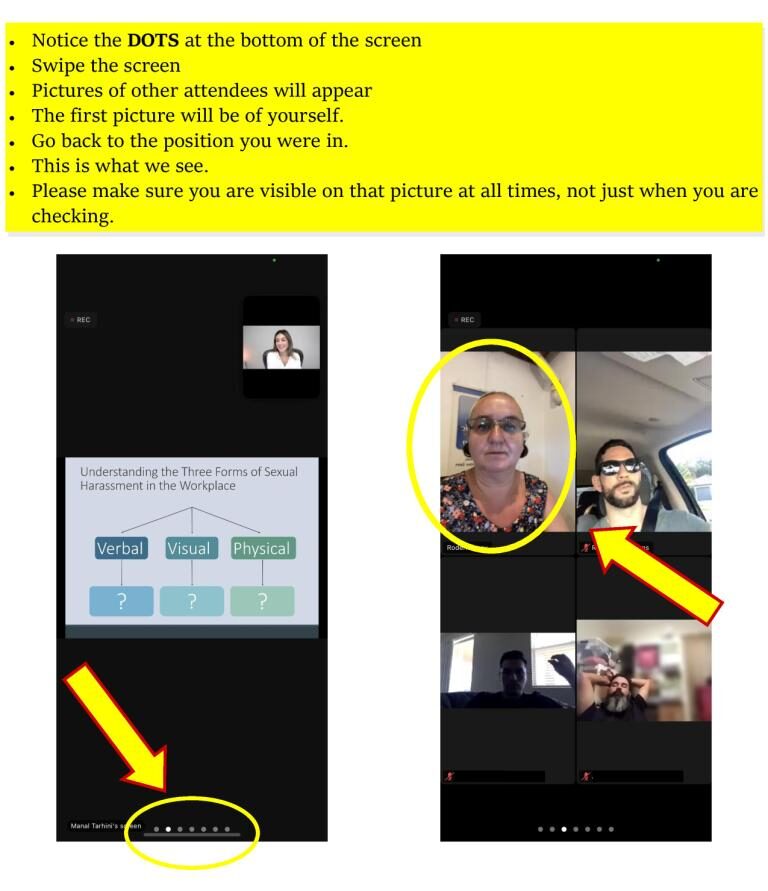
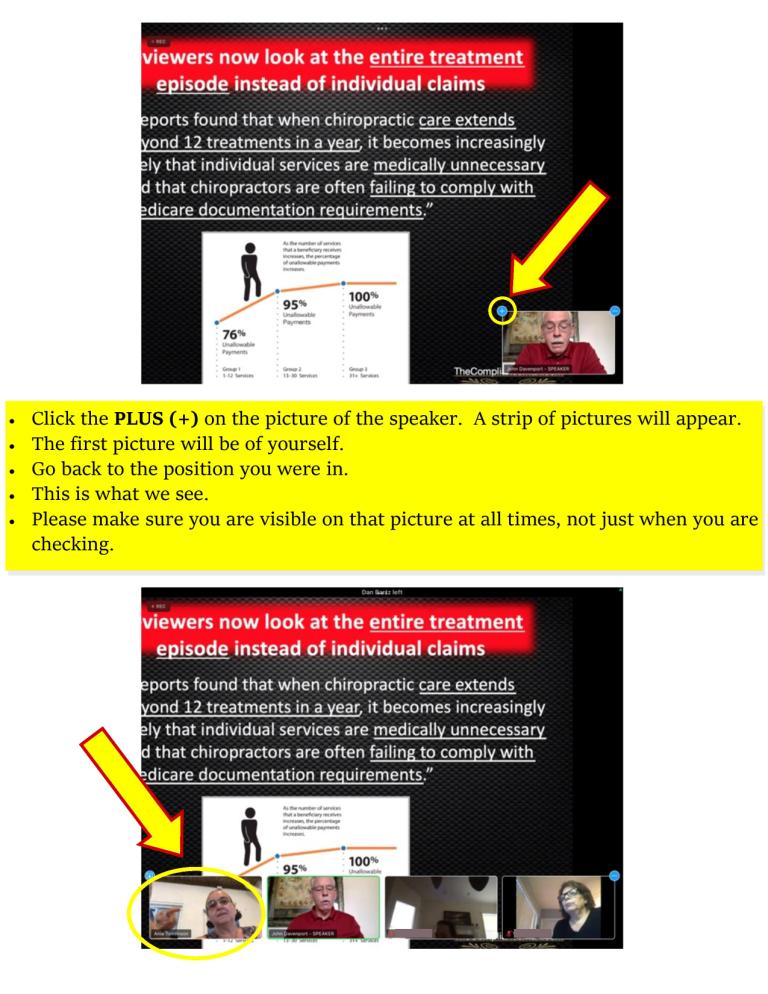
How to remain visible on a tablet or a phone
How to check if you are visible on a phone
How to check if you are visible on a tablet
At the seminar
Once logged in, your device must remain connected and you must remain logged in throughout the event in order to receive credit. If you lose your internet connection at no fault of your own or wish to switch your viewing device, simply re-login using the provided
After the seminar
The hours will be uploaded to CE Broker, after the data is verified. This will be done within 30 days.
A confirmation letter will be emailed to the address you provided on the registration form.
Virtual CE Events Registration
The registration form might take a few seconds to submit, please refrain from pressing the send button repeatedly.
Please refrain from using all caps when filling out the form.
Zoom Registration Form
The registration form might take a few seconds to submit, please refrain from pressing the send button repeatedly.
Please refrain from using all caps when filling out the form.
Registration form in-person CE Seminar
In order to report your hours accurately and to receive confirmation from the University, please be sure that your address is current and can be used as the standard USPS format. Please refrain from using all caps when filling out the form.
Error: Contact form not found.
Registration form
In order to report your hours accurately, please be sure that your address is current and can be used as the standard USPS format. Please refrain from using all caps when filling out the form.
Error: Contact form not found.
We use cookies to ensure that we give you the best experience on our website. If you continue to use this site we will assume that you are happy with it.